
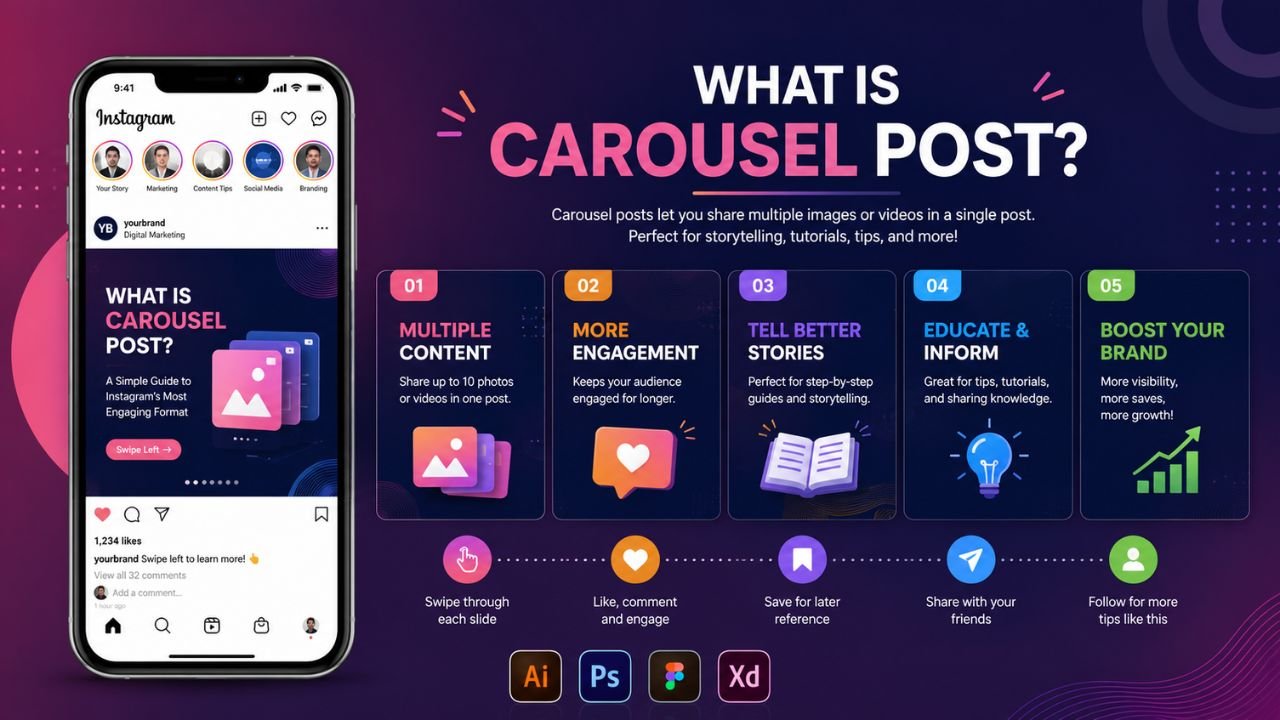
A carousel post is one of the most effective content formats on social media right now. It also allows you to post many images or videos within one post, and your reader will swipe through each slide one at a time. You would swipe through a structured, single experience with five photos in one. That wrench of a mechanic alters the way people engage with your content altogether.
Companies, artists, and teachers all use this format as it can last longer than a picture ever would. As one passes through your slides, he or she is not only looking at your work but actively interacting with it. Emphasizing the importance of that active involvement, that action is a direct signal to the algorithm that has a beneficial long-term impact on your reach and visibility.
Core Definition of a Carousel Post
The carousel post meaning goes beyond just multiple images in one post. It represents a structured storytelling format where each slide plays a specific role. The term “carousel” refers to the rotating fairground ride, and social media borrowed that concept to mean a rotation of content through frames in sequence.
The post is a multi-slide social media post with the number of pictures or videos being 2 or more. The mobile viewers scroll left, or desktop users have an arrow, to navigate through each frame. The opening slide is posted in the feed, and the rest of the slides remain in the background until a user decides to view. It is this managed disclosure that makes the format so potent in storytelling and education.
Where do Carousel Posts Appear?
Carousel posts can be found on a variety of large platforms, albeit with some variations in how they are expressed.
- Instagram supports up to 20 slides per post with images and videos
- LinkedIn uses document-style carousels as PDF slide decks
- Facebook supports carousel ads with individual links per slide
- TikTok uses Photo Mode for multi-image slideshows with background music
All platforms have the same fundamental mechanic, although the logic of distribution and audience behavior differs. The carousel posts are the most recorded in terms of performance data, and the use cases are the broadest on Instagram.
What Is Carousel Post on Instagram and How Does It Work?
The carousel post form became mainstream on Instagram, so having insights into its particular mechanics will give you a true advantage. Instagram allows posting one carousel with up to 20 images or videos. The initial slide serves as the guide to the rest of the post, both visually and in the sense in which it is distributed on Instagram.
The Second-Chance Distribution Mechanic
The carousel posts have a distribution advantage granted to them on Instagram that is not granted to other formats. Where Instagram can instill fear of missing one of your posts, someone scrolling through you without swiping on the first slide will be presented with another slide by you in their feed later. Your second-chance mechanic is that your content has more than one chance to win the interest of the same viewer. Such behavior is sufficient to make carousel posts more worth prioritizing and single-image posts less worthy in nearly all cases.
Instagram Carousel Size Requirements
Getting the technical specifications right protects your creative from Instagram’s auto-crop. It adjusts its reference to the crop on the first slide, so any subsequent slide would have to conform to that ratio. When they do not fit, Instagram substitutes and tends to trim faces, text messages, or vital design features.
| Specification | Requirement |
| Supported aspect ratios | 1:1 (square), 1.91:1 (horizontal), 4:5 (vertical) |
| Recommended image resolution | 1080 x 1080 px |
| Minimum video resolution | 600 x 600 px |
| Maximum video resolution | 1080 x 1080 px |
| Aspect ratio reference | First slide set crop for all slides |
| Maximum slides allowed | 20 images or videos |
The 1080 x 1350 pixels (vertical 4:5 format) is likely to work best on mobile since it offers more on-screen space. The more space on screen, the more time the viewer is staring at your content, and that time will directly affect your algorithmic ranking.
Carousel Post Performance Compared to Other Instagram Formats
Numbers tell the real story here. These posts consistently outperform every other content format on Instagram across the metrics that matter most. Socialinsider’s analysis of 35 million Instagram posts shows carousels hold a steady 0.55% engagement rate, beating Reels at 0.50% and static images at 0.45%. Buffer’s 2026 analysis of over 52 million posts found that carousels generate 109% more engagement than Reels on Instagram.
The three formats have truly different purposes, and therefore their comparison will assist you in making smarter choices concerning which of the formats to utilize.
| Format | Primary Strength | Top Engagement Type | Best Use Case |
| Carousel Post | Depth and saves | Saves, profile visits | Education, storytelling, product reveals |
| Reel | Discovery and reach | Comments, shares | Viral content, new audience growth |
| Single Image | Speed and simplicity | Likes | Announcements, quotes, visual moments |
Reels introduce you to new audiences via the Explore feed. Carousels nevertheless turn current observers into devotees since the arrangement compensates effectively for well-arranged material. A Reel that has 500,000 views and very few new followers often has a lesser performance in comparison to a carousel with 8,000 views and 400 saves. The quality of the save signals is much more clearly communicated than an active view does.
How to Create a Carousel Post on Instagram
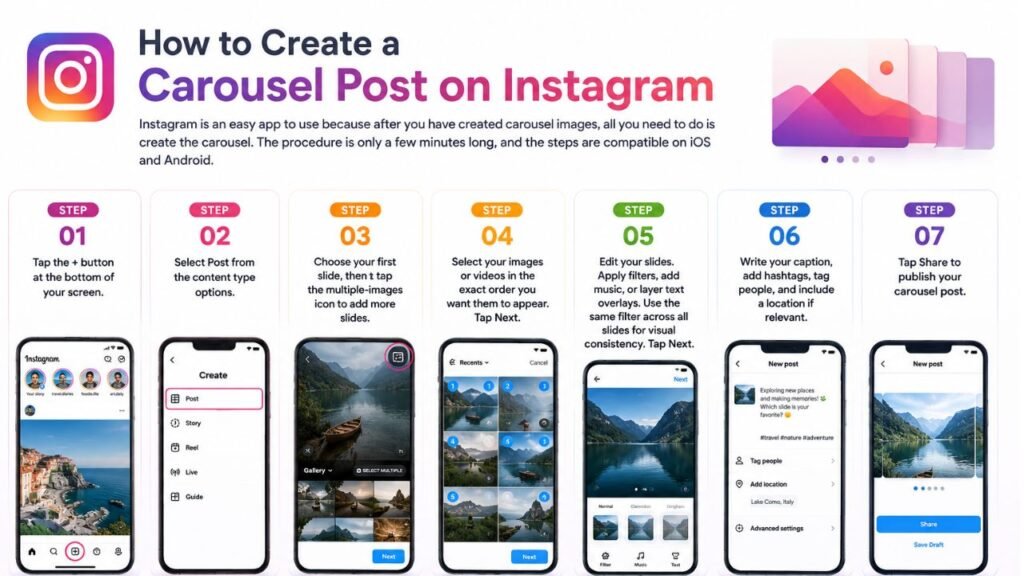
Instagram is an easy app to use because after you have created carousel images, all you need to do is create the carousel. The procedure is only a few minutes long, and the steps are compatible on iOS and Android.
Step 1. Tap the + button at the bottom of your screen.
Step 2. Select Post from the content type options.
Step 3. Choose your first slide, then tap the multiple-images icon to add more slides.
Step 4. Select your images or videos in the exact order you want them to appear. Tap Next.
Step 5. Edit your slides. Apply filters, add music, or layer text overlays. Use the same filter across all slides for visual consistency. Tap Next.
Step 6. Write your caption, add hashtags, tag people, and include a location if relevant.
Step 7. Tap Share to publish your carousel post.
One tip that can be useful to remember: Add music to your carousel post. Instagram places music-enabled carousels just like Reels regarding distribution, which implies that they appear in more places on the feed without compromising the swipeable feature. That single move has the potential to further increase your organic reach with no additional effort.
Best Carousel Post Ideas That Drive Engagement
Posts in the carousel that are most successful assign a distinct job to each slide. Slides that are either unclear or redundant slow the swipe motion and reduce the completion rate. Therefore, Instagram monitors the number of viewers who see the last slide and makes any frame meaningful, directly enhancing your distribution.
Content Types That Work Best in Carousel Format
- Educational tutorials that walk viewers through a process step by step.
- Product reveals that build anticipation across multiple slides before the final CTA.
- The collections of user-generated content containing the photos or reviews of customers.
- Information and infographics in which there is one precise stat or insight per slide.
- Content that moves horizontally by swiping so the viewer physically moves through the transformation.
- Background information that makes it more personal and explains the way your team functions.
- Event recaps that combine highlights, candid shots, and key takeaways in one post.
Best Practices for Higher Reach and Saves
Powerful execution is what makes the difference between the posts that are saved and maximized versus those that get no action whatsoever. These habits always produce an ascertained difference in performance; thus, implementing them initially spares a lot of unnecessary effort in the future.
Slide Structure and Design Rules
- Have a hook slide that garners the swipe either by making a big impact visually or giving a straightforward promise.
- Limit each slide to one idea, making the story simple to follow.
- Appear visually uniform on all the slides using the same colors, fonts, and space.
- Create each slide in a mobile-friendly version, as the majority of attendees watch your screen on a small screen.
- Locate significant words and pictures not at slide borders where auto-crop might cut them.
- Create a sense of momentum by disclosing a little at a time.
- Finish with a call to action, concise and clear, at the end of the last slide.
Common Mistakes That Reduce Performance
- Posting slides with aspect ratios that do not match, thus causing an auto-crop in Instagram.
- Burying too much text or design elements in individual slides.
- Using the last slide as a kind of rudimentary last when it must be the best.
- Bypassing the mobile preview before publication results in layout surprises.
- Same first line or visual style of all the slides, which eliminates the reveal effect.
How to Schedule a Carousel Post for Maximum Impact
Placing carousel posts ahead of schedule allows the content to be published at intervals without you having to be at an ideal time when the post is placed. Instagram has an in-built scheduler; however, it has practical drawbacks as compared to third-party applications.
Native Instagram Scheduling Steps
Step 1. After creating your carousel, tap More options on the Share page.
Step 2. Toggle on Schedule this post.
Step 3. Choose your date and time. Tap Done.
Step 4. Return to the Share page and tap Schedule instead of Share.
Scheduling Tool Comparison
| Feature | Instagram Native App | Meta Business Suite | Sprout Social |
| Schedule carousel posts | Yes, one at a time | Yes | Yes, including bulk scheduling |
| Visual content calendar | No | Yes | Yes |
| Edit or reschedule posts | Via the Settings menu | Yes | Directly from the calendar |
| Optimal send time suggestions | No | Yes | Yes, AI-powered |
| Multi-profile management | No | Yes | Yes |
Native scheduling works fine for occasional posts. To have a complete content calendar, a third-party solution grants you much more control over timing, content editing, and tracking performance without getting bounced around through a series of settings menus.
Future of Carousel Posts in 2026 and Beyond
Instagram’s Carousel Reels format, introduced in 2025, combines the swipeable carousel structure with Reels-style algorithmic distribution. Preliminary numbers reveal that this hybrid format records one-to two-fold higher engagement and reach than usual Reels. This format is bound to be the default format used by more creators as the format gets adopted by more brands, and it tends to give more depth and discovery into a single post.
The carousels are also becoming popular as a B2B form of content on LinkedIn. The carousel-style document that disaggregates industry structures or research discoveries drives an unequal amount of engagement on LinkedIn, relative to text posts or image posts. Professional brands have quickly turned to this format as the most credible means of establishing thought leadership in an organic manner.
Commerce embedded carousels also are increasing. The product tagging on individual slides is a product that Instagram currently offers, wherein a viewer is able to shop from any frame of their choice without the need to leave the app. That functionality bridges the gap between discovery and purchase of content, which makes such posts all the more valuable when it comes to e-commerce brands eager to minimize friction in the purchasing process.
Conclusion
Carousel posts are one of the most reliable content formats available on social media right now. They are systematically more engaging, saving, and have a better long-term reach compared to static images and Reels. The format appreciates form, clarity, and purposeful design as other forms of post do not. You can choose to build your personal brand, or you can operate a sizable content machine involving a business. These posts should be front and center in your plan. Begin with a powerful opening, stay on point with subsequent slides, and also you should end a slide with a powerful purpose. That strategy repeats itself, and the outcome will be reflected in your analytics each time.